AI Appointment Booking Bots: How They Work and Whether Your Business Needs One
By Calvy Team · June 27, 2026
An AI appointment booking bot promises something every busy service business wants: a tireless assistant that answers questions, finds open slots, and books clients around the clock — without you ever touching the phone. But the term covers everything from a simple chat widget to a full conversational AI, and the marketing rarely explains what actually happens under the hood or whether your business needs one at all.
This guide cuts through the noise. We'll explain how AI appointment booking bots really work, how they differ from a plain chatbot or a self-service booking page, what they can and can't do, what they cost, and — most importantly — how to tell whether a bot will pay for itself or just add complexity you don't need.
What is an AI appointment booking bot?
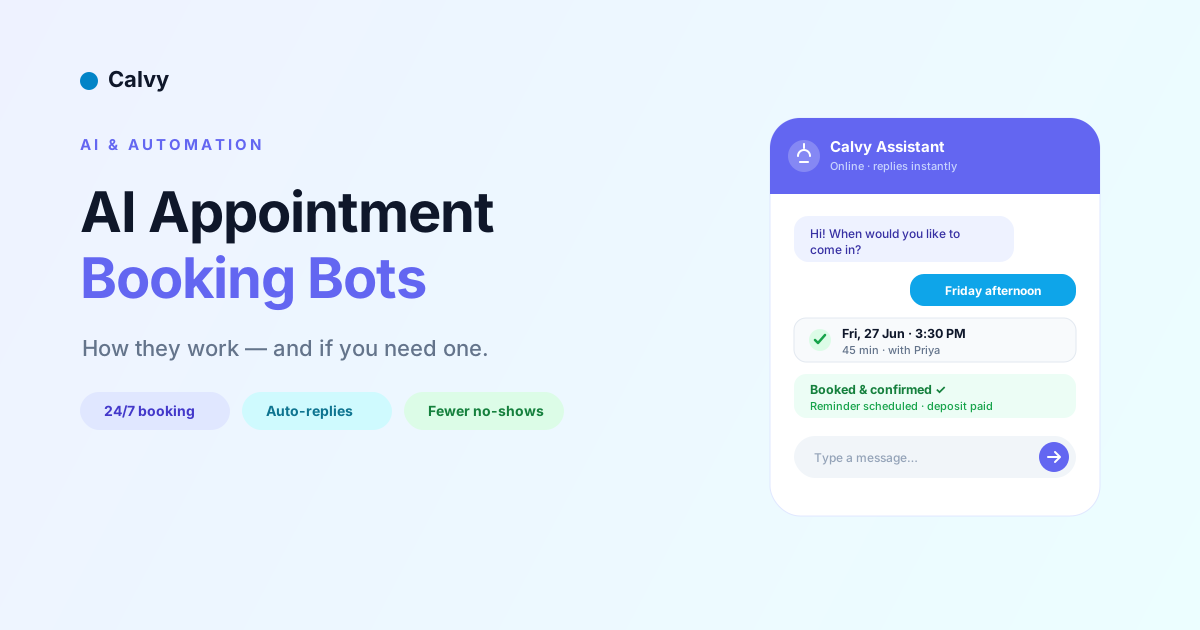
An AI appointment booking bot is software that talks to your customers in natural language and turns that conversation into a confirmed appointment on your calendar. Instead of filling in a form, the customer types (or speaks) something like "Can I get a haircut on Friday afternoon?" and the bot interprets the request, checks your real-time availability, offers matching slots, collects the details it needs, and books the slot.
The "AI" part refers to the bot's ability to understand messy, human phrasing rather than rigid menu choices. A traditional booking flow asks the customer to click through a fixed set of steps. A genuine AI bot can handle "do you have anything after work next week?" and translate that into a search for evening slots over the following seven days.
These bots show up in a few places:
- On your website, as a chat bubble in the corner.
- Inside messaging apps like WhatsApp, Instagram DMs, or Facebook Messenger.
- As a voice agent that answers your phone, understands spoken requests, and books or reschedules calls.
The common thread is conversation. Where a booking page is a structured form, an AI booking bot is a dialogue — and that difference is exactly what makes it powerful for some businesses and overkill for others.
How AI appointment booking bots actually work
It helps to see the booking bot not as one piece of magic but as a short chain of steps working together. Understanding the chain tells you where these tools shine and where they break.
1. Understanding the request (natural language understanding)
When a customer types a message, the bot uses natural language understanding (NLU) — today usually powered by a large language model — to extract intent and details. From "I need a 60-minute deep tissue massage sometime Saturday morning," it pulls out the service (deep tissue massage), duration (60 minutes), and a time constraint (Saturday, morning). Older rule-based bots matched keywords; modern AI bots interpret meaning, which is why they handle typos, slang, and incomplete requests far better.
2. Checking availability
Next, the bot queries your calendar or booking system through an API to find open slots that match. This is the step people underestimate. A bot is only as accurate as the availability data behind it. If it isn't synced to the same calendar your staff use, it will happily double-book. Good systems treat the booking engine as the single source of truth and let the bot read and write to it directly.
3. Collecting the right information
Before confirming, the bot gathers whatever you require: the customer's name, phone number, which staff member they want, and — increasingly — a deposit or upfront payment to secure the slot. A well-designed bot asks only for what's necessary and remembers returning customers so they don't repeat themselves.
4. Confirming and following up
Finally, the bot writes the appointment to your calendar, sends a confirmation, and schedules reminders. The booking itself is the start, not the end. The reminders that follow are what actually reduce no-shows, and the best setups handle confirmations, reminders, and rescheduling links automatically.
When all four steps are tightly connected to one booking engine, the experience feels seamless. When they're stitched together from disconnected tools, you get the failure mode everyone fears: a confident bot that confirms appointments your calendar never received.
AI booking bot vs chatbot vs online booking page
These three terms get used interchangeably, but they solve different problems. Choosing well starts with knowing which one you're actually evaluating.
A plain chatbot answers questions. It can tell a visitor your opening hours, your prices, or where to park. Many chatbots cannot book anything — they hand the customer off to a form or a phone number. If a "chatbot" isn't connected to your live calendar, it's a FAQ tool wearing a booking costume.
An online booking page is a structured, self-service flow. The customer picks a service, picks a time from real availability, enters their details, optionally pays, and confirms. There's no conversation, but there's also nothing to misinterpret — what the customer selects is exactly what gets booked. For most service businesses, this is the workhorse, because it's reliable, fast, and works perfectly on a phone.
An AI appointment booking bot sits on top of (or alongside) that booking engine and adds a conversational layer. It's most valuable when customers arrive with fuzzy requests, when they're already chatting with you on WhatsApp or Instagram, or when you're fielding repetitive phone calls you'd love to offload.
The key insight: a bot without a solid booking engine underneath is a liability, while a booking engine without a bot is still a complete, working system. Start with reliable booking. Add conversation when there's a clear reason to.
Where AI booking bots live: website, WhatsApp, and voice
The same underlying booking logic can wear three very different faces, and the right one depends entirely on where your customers already are.
On your website. The classic chat bubble in the corner catches visitors who have a quick question before committing. It works best when paired with a visible "Book now" button, so people who already know what they want aren't forced into a conversation they didn't ask for. The bot becomes a safety net for the hesitant, not a tollbooth for everyone.
In messaging apps. For many service businesses — especially in markets where WhatsApp and Instagram are the default way customers reach out — the bot lives in the DMs. This is where conversational booking genuinely shines, because the customer is already typing to you. Instead of pushing them to a separate website, the booking happens in the thread they started. The trade-off is setup: each channel has its own rules, approval process, and message templates to configure.
On the phone (voice agents). The newest and priciest category answers your phone, understands spoken requests, and books or reschedules out loud. Voice agents can be transformative for businesses drowning in calls — clinics, large salons, multi-location chains — but they're also the hardest to get right. Accents, background noise, and interruptions all test the technology, and a clumsy voice bot frustrates customers faster than a missed call ever would.
Most businesses don't need all three. Pick the one channel where you're losing the most bookings today, get it working well, and expand only if the numbers justify it. Spreading a half-configured bot across every channel is how you end up maintaining three mediocre experiences instead of one great one.
What an AI booking bot can — and can't — do
Vendors love to show the highlight reel. Here's the honest version.
What a good AI booking bot does well:
- Answers common pre-booking questions ("do you take walk-ins?", "how much is a colour?") instantly, at any hour.
- Interprets vague timing requests and offers concrete slots.
- Books, reschedules, and cancels without a staff member involved.
- Captures leads who would otherwise bounce because no one replied at 9 p.m.
- Routes the customer to the right service or staff member.
- Collects deposits to protect high-demand slots.
What bots still struggle with:
- Edge cases and judgment calls. "My daughter and I both want appointments but at different salons in your chain, and one of us needs wheelchair access" is the kind of request that benefits from a human.
- Reading emotion. An upset customer trying to complain doesn't want a cheerful booking prompt.
- Being correct when the data is wrong. A bot can't fix a calendar that isn't synced; it will confidently repeat bad availability.
- Nuanced upselling. Skilled front-desk staff read the room and suggest add-ons naturally. Bots are improving here but rarely match a great receptionist.
The practical takeaway: treat an AI booking bot as a way to handle the high-volume, repetitive 80% of bookings so your team can spend attention on the 20% that genuinely needs a person. The goal isn't to remove humans — it's to stop humans from being interrupted by routine scheduling.
The real benefits: where bots pay for themselves
Automation is only worth it if it moves a number that matters. For appointment-based businesses, AI booking automation tends to pay back in four ways.
Capturing after-hours demand. A large share of booking intent happens outside business hours — evenings, weekends, lunch breaks. Every request that waits until morning for a callback is a request that might book your competitor instead. A bot (or even a simple 24/7 booking page) converts that intent while it's hot.
Cutting front-desk interruptions. Every phone call to book, confirm, or reschedule pulls a staff member away from the client in front of them. Offloading routine scheduling to automation protects the in-person experience and frees up real hours each week.
Reducing no-shows. Bots that collect a deposit at booking and send automatic reminders attack the two biggest causes of no-shows: zero commitment and forgetfulness. We cover the full playbook in our guide to reducing appointment no-shows, but automation is what makes those tactics consistent rather than something you remember to do on a good day.
Faster response = more bookings. Speed-to-reply is one of the strongest predictors of whether an enquiry converts. An assistant that responds in seconds, every time, simply wins more of the bookings that were already trying to happen.
Notice that three of those four benefits don't strictly require conversational AI — a fast, reliable, self-service booking page with deposits and reminders delivers most of the value. That's worth sitting with before you pay for the fancy version.
Signs your business needs an AI booking bot (and signs it doesn't)
Not every business should rush to add a bot. Use these signals to decide.
You probably benefit from an AI booking bot if:
- You get a high volume of repetitive booking questions across chat, DMs, or phone.
- Customers regularly message you on WhatsApp or Instagram to book.
- You're losing enquiries after hours because no one replies in time.
- Your front desk is overwhelmed and scheduling calls are eating into service.
- You run multiple locations or staff and routing is getting complicated.
You probably don't need one yet if:
- You don't yet have a reliable online booking system at all — fix that first.
- Your booking volume is low enough that you handle it comfortably.
- Your services are highly bespoke and almost every booking needs a real conversation anyway.
- You'd be bolting a bot onto a calendar that isn't properly synced — that just automates mistakes.
The honest sequence for most businesses is: first, get a dependable self-service booking page with reminders and deposits live; then, once that's humming, layer on a conversational bot if your channels and volume justify it. Skipping straight to the bot is the most common — and most expensive — mistake.
How much do AI appointment booking bots cost?
Pricing varies wildly because "AI booking bot" spans such different products. Broadly, you'll see three tiers.
Built into your booking software. Many modern booking platforms include automation — instant confirmations, reminders, online payments, and increasingly a chat or AI layer — as part of a normal subscription. This is the best value for most small and mid-sized businesses because the bot and the booking engine are the same system, so there's nothing to sync and nothing to break. Costs typically look like a standard SaaS plan rather than a separate AI bill.
Standalone AI chat or voice agents. Dedicated conversational-AI vendors charge more, often per conversation, per minute (for voice), or on usage-based tiers. The high cost-per-click on keywords like ai appointment booking bot and ghl appointment booking reflects how much vendors are willing to pay for these customers — which tells you the products themselves aren't cheap.
Custom builds. Hiring developers to build a bespoke bot wired into your systems is the most expensive and least advisable path for a typical service business. Unless you have unusual requirements, off-the-shelf tools have caught up. (We make the same argument about building from scratch in our look at the buy-vs-build decision for booking apps.)
When you compare prices, look past the headline number to the total: subscription, per-conversation fees, payment processing, and the staff time to set it up and maintain it. A cheaper bot that needs constant babysitting is not cheaper.
How to get most of the value without a full AI bot
Here's the part vendors won't tell you: you can capture the majority of the benefit — 24/7 booking, fewer no-shows, less admin — with a well-configured self-service booking system, no conversational AI required. That's exactly what Calvy is built to do.
A strong setup looks like this:
- A public booking page that shows real-time availability for each service and staff member, so customers book themselves in under a minute.
- Online payments and deposits so high-value slots are protected and you get paid up front. (Calvy supports this natively, including UPI and cards via Razorpay for businesses in India.)
- Automatic confirmations and reminders by email and notification, which do the heavy lifting on no-show reduction.
- Easy rescheduling so customers fix their own changes instead of calling you.
This is "automation without a chatbot," and for a huge number of salons, clinics, spas, and coaches it's the right first step. It's reliable, it works on any phone, and there's no risk of a bot confidently mis-booking. You can always add a conversational layer later — but you'll be adding it on top of a system that already works, which is the only safe way to do it.
If you want to explore how the pieces fit together, our Help Center walks through setting up services, availability, payments, and reminders step by step.
How to roll out booking automation without disrupting your business
Even the best tool fails if it's dropped on your business overnight. A staged rollout protects both your team and your customers.
Start with one service and one calendar. Don't automate everything on day one. Pick your highest-volume, most standardised service — the one with the most predictable duration — and get bookings for it flowing reliably first. A single, well-tested flow teaches you more than ten half-finished ones.
Get the availability rules exactly right. Before a single customer touches it, block out buffers between appointments, holidays, staff time off, and the lead time you need (no one wants a booking for 10 minutes from now). Most early automation disasters trace back to availability settings that didn't reflect reality.
Turn on deposits and reminders together. These two features deliver most of the no-show reduction, so switch them on early rather than treating them as extras. Decide your deposit amount and your cancellation window up front, and make both clear to customers at the moment they book.
Watch the first week closely. Read the conversations or bookings that come through. You'll spot questions the system answered badly, slots it offered that it shouldn't have, and points where customers hesitated. Each one is a quick fix that compounds.
Keep a human escape hatch. There must always be an obvious way for a customer to reach a person — a phone number, a "talk to the team" option, an email. Automation should remove friction, never trap someone in a loop. Once the foundation is steady, you can confidently expand to more services, more staff, and, if it makes sense, more channels.
A simple checklist for choosing a tool
Whether you go with a built-in automation layer or a standalone AI bot, run any option through these questions before you commit:
- Does it read and write to one source of truth? The bot and your live calendar must be the same system, or synced so tightly that double-bookings are impossible.
- Can it collect deposits or payments? This is the single biggest lever on no-shows.
- Does it send reminders automatically? And can customers reschedule from those reminders?
- Does it work on the channels your customers actually use? A WhatsApp-first audience needs WhatsApp; a website-first audience needs a great booking page.
- Is it usable on a phone? Most bookings happen on mobile. If the flow is clumsy on a small screen, nothing else matters.
- What's the true total cost? Subscription plus per-conversation fees plus setup time plus maintenance.
- What happens when the bot gets stuck? There must be a clean handoff to a human.
If a tool can't answer the first three confidently, it's not ready to be your booking engine — no matter how impressive the AI demo looks.
The bottom line
An AI appointment booking bot can be a genuine asset: it captures after-hours demand, fields repetitive questions, and frees your team from the phone. But it's only as good as the booking engine underneath it, and for most service businesses the smartest move is to nail reliable self-service booking — with deposits and automatic reminders — before adding a conversational layer.
Get that foundation right and you'll already enjoy most of the benefits people associate with "AI booking": round-the-clock scheduling, fewer no-shows, and far less admin. When your channels and volume genuinely call for conversation, you'll be adding the bot to a system that already works — which is exactly how it should be done.
Ready to put the foundation in place? Start free with Calvy and give your customers a booking experience that works around the clock.
Frequently asked questions
What is an AI appointment booking bot?
It's software that talks to customers in natural language and turns the conversation into a confirmed appointment. It interprets requests like 'can I come in Friday afternoon?', checks your real-time availability, collects details (and often a deposit), books the slot, and schedules reminders.
What's the difference between an AI booking bot and a chatbot?
A plain chatbot mainly answers questions (hours, prices, location) and usually can't book anything on its own. An AI booking bot is connected to your live calendar, so it can actually check availability and create, reschedule, or cancel appointments.
Do I need an AI bot, or is a booking page enough?
For most small and mid-sized service businesses, a fast self-service booking page with online deposits and automatic reminders captures the majority of the value — 24/7 booking and fewer no-shows. Add a conversational bot later if your volume or messaging channels justify it.
How much does an AI appointment booking bot cost?
It ranges from being included in a normal booking-software subscription, to standalone AI agents that charge per conversation or per voice minute, to expensive custom builds. The best value for most businesses is automation built into the booking platform itself, so there's nothing to sync.
Can an AI booking bot reduce no-shows?
Yes — indirectly. The bots that reduce no-shows do it by collecting a deposit at booking and sending automatic reminders with easy rescheduling. Those two features, not the conversation itself, are what cut no-shows, and you can get both from a good booking system without a chatbot.
Will an AI booking bot double-book my calendar?
Only if it isn't connected to a single source of truth. A bot is just as accurate as the availability data behind it. If it reads and writes to the same calendar your staff use, double-booking is prevented; if it's bolted onto an out-of-sync calendar, it can confirm slots you don't actually have.